
Download Screen Recorder Pro – screen recorder, android screen recording, hd recording, no root, video editing, face camera, countdown timer, touch indicator, video effects, magic button
Overview
Screen Recorder Pro - No Root is a dedicated Android application designed for capturing screen activity with high-quality output. The software enables users to record their device’s screen in Full HD, HD, or auto mode, adapting to the device’s capabilities. This makes it suitable for a broad audience, including gamers, educators, content creators, and casual users who need to document on-screen actions.
The app operates without requiring root access, ensuring compatibility with a wide range of Android devices running Android 5.0 and above. It is developed by Köksal Yazılım, a company focused on creating practical mobile utilities. The application is ad-free, promoting uninterrupted recording sessions.
Real-world use cases include creating tutorial videos, capturing gameplay highlights, recording online lectures, or documenting app interactions. The developer did not provide additional system requirements or performance benchmarks, so actual behavior may vary based on device hardware and usage patterns.
Key Features & Capabilities
- HD and Auto Recording Modes – Users can choose between Full HD, HD, or auto mode, allowing the app to adjust recording quality based on device performance and available storage.
- Audio Recording Options – The app supports recording with or without audio, making it ideal for capturing voiceovers, game soundtracks, or silent tutorials.
- Face Camera Integration – Enables users to overlay a live feed from the front-facing camera during screen recording, useful for video commentary or face-to-face tutorials.
- Countdown Timer – A built-in countdown feature allows users to prepare before recording begins, ensuring a smooth start without rushing.
- Touch Indicator – The option to show or hide touch indicators helps maintain clarity in recordings, especially when demonstrating user interactions.
- Video Effects – Offers visual enhancements such as White, Black, and Sepia filters, adding creative flexibility to recorded content.
- Post-Recording Editing Tools – After recording, users can cut clips, apply filters, and add background music, streamlining the content creation workflow.
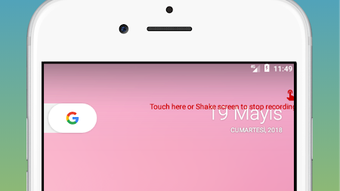
- Magic Button Feature – A quick-stop function that allows users to end a recording by tapping the right corner of the screen, ideal for spontaneous or fast-paced recording sessions.
These features collectively support diverse workflows, from educational content creation to gaming highlights. The ability to edit videos directly within the app reduces the need for external tools, enhancing efficiency for users who prioritize speed and convenience.
User Interface, Workflow & Performance
Screen Recorder Pro features a clean and intuitive interface, designed to minimize user effort during recording sessions. Navigation is straightforward, with essential controls accessible through a floating overlay or a dedicated menu. The workflow is optimized for quick access—users can initiate recording with minimal taps, and key settings are logically grouped.
The app supports real-time adjustments, such as toggling audio, enabling the face camera, or activating the countdown timer. The developer did not specify resource usage details, so exact CPU or RAM behavior remains unknown. Performance observations are based on general software behavior patterns for similar screen recording tools.
Stability during extended recording sessions has not been documented, and no information was provided about background operation or battery impact. However, the ad-free design suggests a focus on uninterrupted performance, which may contribute to smoother operation under normal conditions.
Compatibility & System Requirements
Screen Recorder Pro is compatible with Android 5.0 and above, ensuring broad accessibility across older and newer devices. The application has a file size of 27.4 MB, indicating a lightweight footprint suitable for devices with limited storage. The software version is 2.1.1, which may include bug fixes and minor improvements over earlier releases.
The developer did not specify exact hardware requirements beyond the OS version. This means users should expect variable performance depending on device capabilities, such as processor speed, GPU performance, and available RAM. Compatibility information was partially provided, and no details were shared about tablet support or specific device optimizations.
Users are advised to test the app on their device to confirm functionality.
Pros and Cons
Pros
- High-quality recording in Full HD, HD, or auto mode
- Ad-free experience for uninterrupted recording
- Supports face camera, countdown timer, and touch indicators
- Includes built-in video editing tools for quick post-production
- Magic button allows instant recording stop with a single tap
- Lightweight at 27.4 MB, suitable for devices with limited storage
Cons
- No information provided on CPU or RAM usage
- Exact performance behavior during long recordings not specified
- Limited compatibility details beyond Android 5.0
- Video editing capabilities may be basic compared to professional tools
- Price point of $2.99 may be considered high for a single-purpose app
FAQ Section
Is Screen Recorder Pro compatible with all Android devices?
The app is compatible with Android 5.0 and above. However, exact performance and feature availability may vary depending on device hardware and manufacturer modifications.
Is the app safe to use without root access?
Yes, Screen Recorder Pro is designed to function without root privileges, reducing security risks associated with elevated permissions.
Does the app support video editing after recording?
Yes, users can edit recordings by cutting clips, applying filters, and adding background music directly within the app.
Can I record audio along with the screen?
Yes, the app allows recording with or without audio, giving users control over sound capture during screen sessions.
Is there a free version available?
No, the app is a full version program priced at $2.99. No free or trial version was mentioned in the provided information.
Final Thoughts
Screen Recorder Pro - No Root delivers a solid combination of core recording features, creative tools, and user-friendly design. Its ability to record in high quality without requiring root access makes it a reliable choice for Android users seeking a straightforward screen capture solution. The inclusion of a magic button, face camera, and in-app editing enhances usability, especially for content creators and educators.
While the lack of detailed system requirements and performance data limits in-depth evaluation, the app’s lightweight size and ad-free interface are strong advantages. It stands out in its category for balancing functionality with simplicity. For users who value quality, ease of use, and minimal interruptions, this tool offers compelling value.
Download Screen Recorder Pro now.





.png)

